For coaches & athletic trainers
Know your team before practice.
Your athletes check in every morning. You see who's ready, who's tired and who needs a conversation — without a single group chat.
Set up in two minutes
Code in. Done.
Create a team
In the app: Me → Coach mode → New team. You get a six-character code, a link and a QR code.
Athletes join
They scan the QR or type the code and pick a nickname. No emails, no phone numbers, no rosters to import.
Watch the board
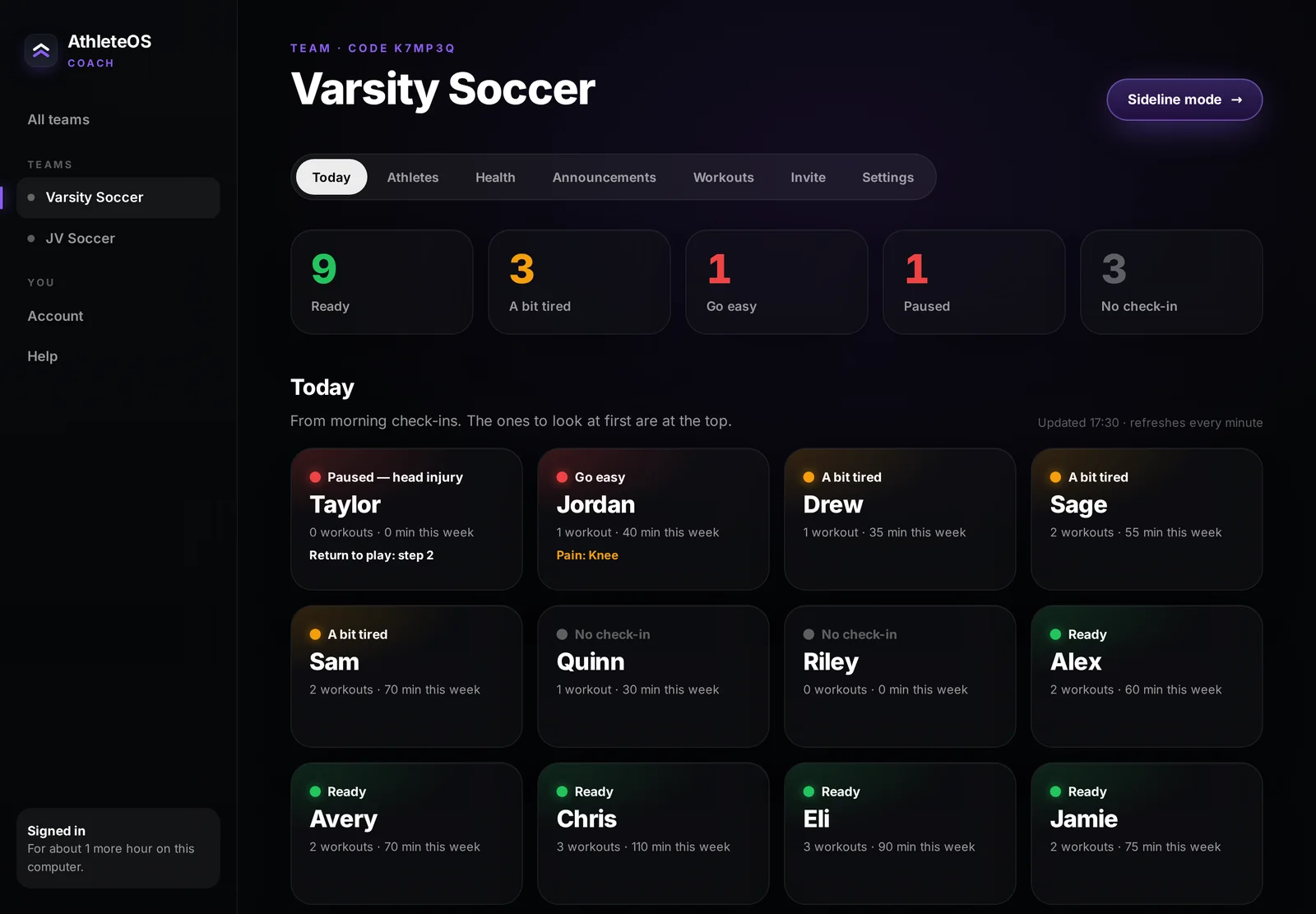
Morning check-ins fill the board. Open it on your phone, an iPad on the sideline, or the web dashboard.
What you get
Free for every coach.
- Readiness board
- Today's readiness in words, a 14-day trend, check-ins missed, and workouts and minutes this week.
- Sideline mode
- Full-screen tiles on an iPad or laptop that refresh every minute and keep the screen on.
- Announcements
- One-way messages on every athlete's Home for 14 days. No replies, no chat to moderate.
- Private notes
- Specific, private notes to one athlete — one a week each on free, as many as you like with Pro. Praise that lands, without a public ranking.
- Send workouts
- Pick exercises from the library and send them for a day — they appear ready to start. (Pro)
- CSV export
- Download the week from the web dashboard for your own records.
For athletic trainers
A return-to-play log that athletes see.
The coach makes an athletic-trainer code; you join with it. You see health — and only health — for athletes who chose to share it.
- Pain reports: where, how much, and how many days in the last two weeks
- Training pauses after a head injury, with the date
- Record the return-to-play step (1–6) with a note — the athlete sees it in their app
- History of every recorded step, newest first
You decide the step. AthleteOS only records it — it never clears anyone to play.
Return to play
Jordan
Paused since Mon, Sep 28
Privacy for your athletes
They share what they choose.
- By joining, an athlete shares their nickname, check-in status, readiness band and how much they trained.
- Health is off by default — each athlete turns it on per team.
- Coaches never see notes, reflections, food or anything an athlete wrote.
- No ads, no data sold, no third-party trackers.
Web dashboard
No password. Ever.
Open the dashboard on any computer, scan the QR code with your iPhone camera and approve it in AthleteOS. You're signed in for 12 hours, and a photo of the screen can't sign anyone else in.
Open the dashboard →Questions
Coaches ask.
What does it cost a coach?
How many athletes and teams?
Can athletes see each other?
Do my athletes need Pro?
Is it a medical tool?
Bring your team onto one screen.
Download AthleteOS, open Coach mode, and give your athletes the code.